
Cursor Plan Usage
See your Cursor plan usage without leaving the editor.
Live Cursor Models and Other Models percentages in a dockable sidebar and status bar — plus git-aware windows for spend since your last commit or while you’re on a feature branch.
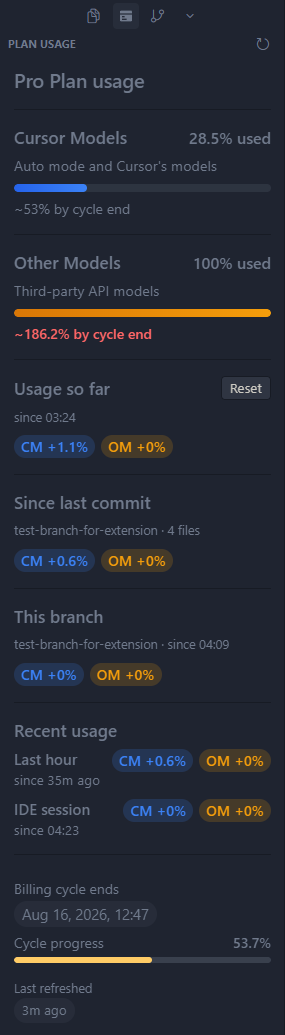
Captured with Rustshot
What you get
Cycle totals, custom windows, and git-aware deltas — without leaving Cursor.
- Sidebar panel CM / OM usage at a glance in the activity bar
-
Status bar chip
CM n% · OM n%cycle totals, or deltas for Usage so far / Since last commit / This branch - Billing cycle Progress through the period, end time, and a simple projection
- Session deltas Last-hour usage persists across reloads; IDE-session usage is since this Cursor window opened
- Usage so far Resettable window that persists across reloads; auto-resets on a new billing cycle
- Since last commit Plan % burned while the working tree is dirty; resets on each commit. Hidden when the tree is clean
-
This branch
Plan % while a feature branch is checked out; pauses on
main/ other branches and restores when you return. Hidden on the default branch - Smart refresh Updates on focus and AI activity; pauses when Cursor is unfocused
Install in Cursor
Extensions tab → search → install. That’s it.
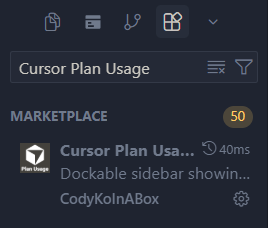
- Open Extensions
- Search Cursor Plan Usage by CodyKoInABox
- Install
Also on Open VSX.
Open source
MIT licensed and fully readable on GitHub. Audit it, fork it, or send a pull request.
Privacy
Your access token stays in your machine. No telemetry. No third-party API calls.
Lightweight
Built to stay out of your way. Smart refresh pauses when Cursor is unfocused and avoids unnecessary background work.
Native to Cursor
Lives in the sidebar and status bar, using Cursor’s existing UI instead of opening another dashboard.